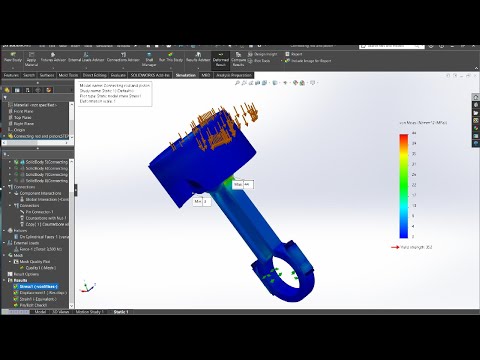
In modern mechanical design, verifying structural integrity before manufacturing is critical. In this engineering simulation case study, we explore how SolidWorks Simulation accurately models the complex interaction between a connecting rod and a piston assembly. By leveraging advanced virtual connectors, engineers can predict stress distribution and potential points of failure under high cyclic loads without building expensive physical prototypes.
Mastering Virtual Connectors in SolidWorks
Assemblies like internal combustion engines rely on precise joints, pins, and bolted connections. Modeling every physical thread or contact surface in Finite Element Analysis (FEA) can lead to exponentially high computational costs. SolidWorks Simulation solves this challenge through virtual connectors.
By utilizing virtual bolts, pins, and bearing fixtures, designers can replicate real-world dynamic behaviors while keeping the mesh lightweight. Applying these connectors allows you to simulate physical interactions—such as bolt pre-loads, friction, and joint stiffness—efficiently and accurately.
Analyzing the Connecting Rod and Piston Assembly
In a typical engine cycle, the connecting rod and piston endure extreme tensile and compressive forces. Conducting a thorough engineering simulation case study on this system involves several key steps:
- Defining Material Properties: Assigning high-strength steel or aluminum alloys to the respective components.
- Applying Connectors: Setting up virtual pin and bolt connectors between the piston wrist pin, connecting rod small end, and big end bearings.
- Setting Boundary Conditions & Loads: Applying maximum cylinder pressure onto the piston crown while constraining the crankshaft journal end.
- Meshing and Execution: Applying localized mesh refinement at high-stress region transitions, such as the rod shoulder and pin holes.
The resulting stress heatmaps (Von Mises stress) reveal critical load paths, enabling design teams to optimize wall thickness and reduce unnecessary weight while ensuring safe operational limits.
Conclusion: Elevate Your Simulation Workflow
Understanding how to properly configure mechanical connectors transforms static CAD models into actionable predictive insights. This engineering simulation case study demonstrates that combining realistic assembly constraints with simplified connectors delivers fast, reliable results. Mastering these SolidWorks techniques ensures safer, higher-performing mechanical components before you ever hit print or manufacture.


