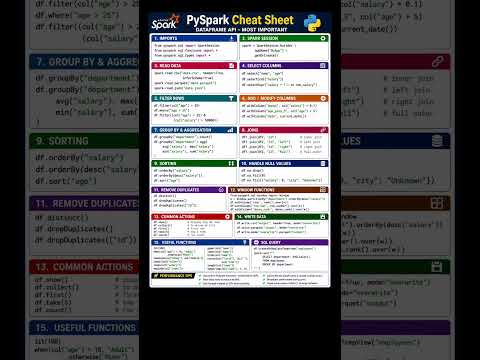
Building efficient data pipelines requires a solid understanding of PySpark, especially when handling big data workloads. Whether you are transforming massive datasets or building complex ETL workflows, having a structured reference guide ensures your data pipelines run smoothly and adhere to exact technical standards. In big data analytics, treating your code standards and transformations like a detailed engineering specifications sheet can dramatically improve output consistency and speed up development.
Essential PySpark DataFrame Commands for Daily Work
PySpark provides an ideal API for distributed computing, but mastering its vast array of methods can be challenging. To streamline your workflow, every data engineer should maintain a reliable engineering specifications sheet covering fundamental DataFrame operations.
Here are some of the most critical PySpark DataFrame commands you need in your daily toolset:
- Reading and Writing Data: Master
spark.read.format()anddf.write.mode()to seamlessly interact with Parquet, CSV, and JSON formats. - Data Filtering and Selection: Use
select()andfilter()(orwhere()) to isolate key columns and apply conditional logic efficiently. - Column Transformations: Employ
withColumn()andwithColumnRenamed()to modify existing features or create calculated metrics on the fly. - Aggregations: Leverage
groupBy()alongside built-in SQL functions likecount(),sum(), andavg()to extract valuable business insights from raw data. - Joining Datasets: Perform high-performance
join()operations (inner, left, outer) to merge disparate datasets effectively.
Why Standardizing Your PySpark Operations Matters
By integrating these core PySpark commands into your team's best practices, you eliminate guesswork and optimize query runtime performance. Utilizing this quick-reference guide as your functional engineering specifications sheet for PySpark tasks ensures that your data processing pipelines maintain strict data governance, clean structure, and scalable performance across environments.
Whether you are preparing for a technical data engineering interview or optimizing high-throughput production jobs, keeping these essential PySpark commands top of mind will empower you to write cleaner, faster, and more maintainable Python code.
