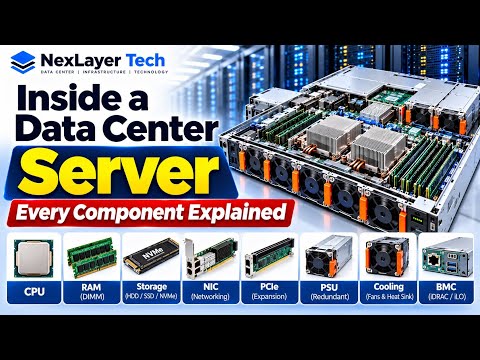
Modern data centers serve as the backbone of our digital world, powering everything from high-scale cloud services to mission-critical enterprise applications. But have you ever wondered what actually sits inside a high-performance rack server? Understanding the internal architecture of these machine behemoths is vital for IT professionals, infrastructure managers, and tech enthusiasts.
The Core Components of an Enterprise Server
When you remove the top cover of an enterprise rack server chassis, you reveal a carefully engineered system designed for maximum redundancy and computing power. Key components include:
- Central Processing Units (CPUs): The primary computational engine, often deployed in multi-socket configurations to handle intense enterprise workloads.
- System Memory (RAM): Enterprise-grade ECC (Error-Correcting Code) RAM modules that automatically detect and correct data corruption to maintain maximum uptime.
- Storage Drives & Backplanes: Hot-swappable NVMe SSDs and SAS/SATA drives configured in RAID arrays to ensure high-speed data delivery and data redundancy.
- Power Supply Units (PSUs): Dual hot-swappable, high-efficiency power supplies that allow continuous operation even if one power feed fails.
- Cooling Modules & Heatsinks: High-static-pressure fan arrays coupled with massive copper or aluminum heatsinks engineered to draw heat away from thermal hotspots.
Why Server Anatomy Matters for Diagnostics
When a server node goes offline or underperforms in a production cluster, speed is of the essence. Mastering engineering hardware troubleshooting relies heavily on knowing how these internal components interact under load. Recognizing early warning signs—such as thermal throttling from a failing fan, memory bus errors, or degraded RAID arrays—can prevent catastrophic data loss and costly downtime.
Effective engineering hardware troubleshooting starts with a structured, component-by-component diagnostic process. By evaluating system event logs, analyzing onboard motherboard diagnostics, and inspecting physical LED indicators, engineers can quickly isolate hardware faults and execute quick hot-swaps without interrupting cluster operations.
Streamlining Hardware Maintenance and Uptime
Diving inside an enterprise rack server removes the mystery behind cloud infrastructure. By embedding structured engineering hardware troubleshooting practices into your routine operational workflows, you can extend hardware lifecycles, optimize system thermal dynamics, and guarantee rock-solid availability across your entire data center deployment.